Last Updated: October 25, 2026
Quick Summary
Manage desk-related neck pain by adjusting your workstation so your monitor sits at eye level about one arm’s length away, taking movement breaks every 60 minutes, and performing neck stretches two to three times daily. Most cases improve with posture changes and regular movement without requiring professional intervention.
- Position your monitor top at or just below eye level and sit roughly 50-70 cm away to reduce forward head strain.
- Take a five-minute break at least every 60 minutes to stand, walk, and change position throughout your day.
- Perform neck stretches two to three times daily, holding each stretch for 15-30 seconds without bouncing.
- Adjust your chair so elbows bend at 90 degrees, feet rest flat, and there is a two to three finger gap behind your knees.
- See a physiotherapist if pain persists despite changes for two to three weeks, radiates into your arms, or causes numbness and tingling.
Table of Contents
- Why Desk Work Causes Neck Pain and Stiffness
- Desk Posture for Neck Pain: Setting Up Your Workstation
- Neck Stretches for Desk Workers: A Daily Routine
- How Often to Take Breaks from Sitting
- Movement and Mobility Throughout Your Workday
- When to See a Physiotherapist for Neck Pain
- Book Your Assessment at Kinetika
- Frequently Asked Questions
Why Desk Work Causes Neck Pain and Stiffness
Desk-related neck pain affects many office workers. When you work at a desk, your head drifts forward to see the screen, and this forward head posture strains your neck muscles. (Source: global statistics on musculoskeletal disorders)
Think of your head as a bowling ball: balanced above your shoulders the load is light, but move it forward a few centimeters and your neck muscles work far harder.
Prolonged sitting makes it worse: muscles tighten, blood flow slows, and stiffness creeps in.
Static posture is the real culprit, staying still fatigues muscles and limits range of motion, and slouching makes it worse.
Desk Posture for Neck Pain: Setting Up Your Workstation
Your workstation setup is the foundation for managing desk-related neck pain. Learn more about how to prevent back pain from desk work to address related issues affecting your spine.
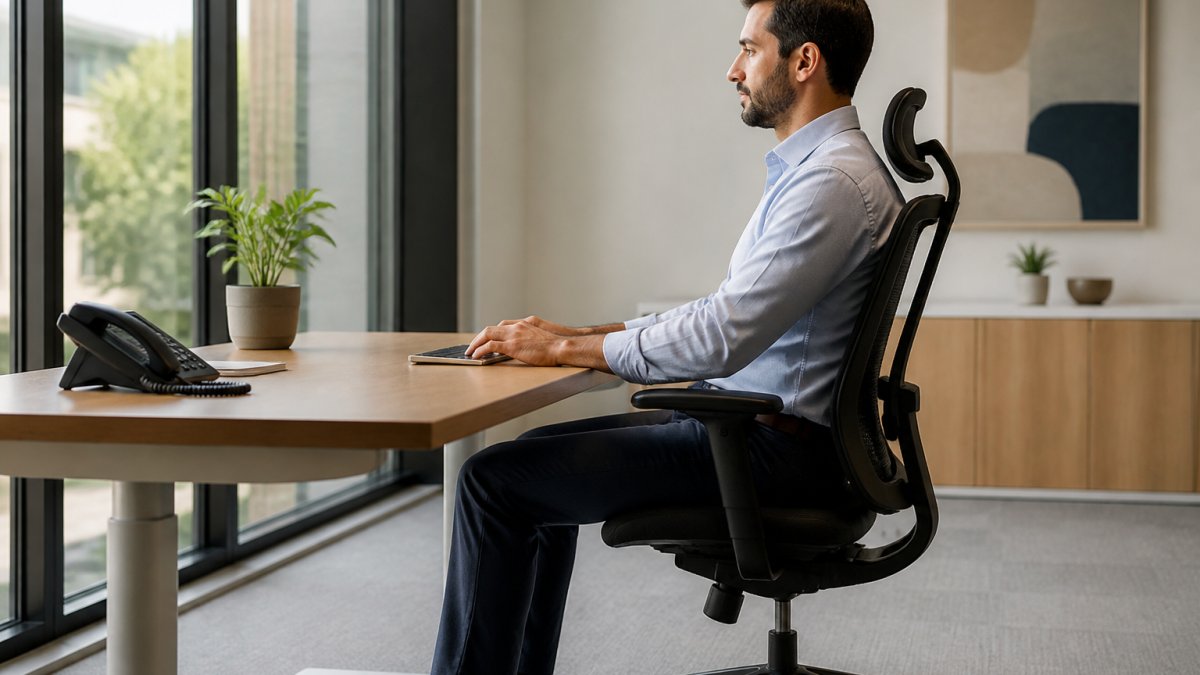
The goal is an upright posture that feels natural, not forced: ears, shoulders, and hips aligned vertically. Understanding poor posture and its effects helps you recognize why these alignment points matter for your neck.
A Measurable Workstation Checklist
Generic advice like “sit up straight” is hard to act on. Use these measurable checks instead, each gives you a number or reference point to confirm your setup.
- Screen height: The top line of text on your monitor should sit at or just below eye level when you look straight ahead with a relaxed neck. If you have to tilt your chin down or crane up, adjust the monitor.
- Viewing distance: Sit roughly one arm’s length from the screen, about 50-70 cm for most people. Hold your arm out; your fingertips should just reach the screen.
- Elbow angle: With your shoulders relaxed, your elbows should bend at about 90 degrees, and your forearms should be roughly parallel to the floor.
Work through the list one item at a time. Fixing screen height and viewing distance delivers the biggest change to head and neck posture, so start there.
Monitor Height and Viewing Distance
Your monitor position directly controls your head posture. Place the top of the screen at or slightly below eye height and sit about an arm’s length away. On a laptop, use a stand or external monitor paired with an external keyboard and mouse to avoid hunching.
Chair, Back, and Neck Support
A good chair keeps your back upright and your neck neutral, so look for adjustable height and lumbar support. Sit with feet flat and knees bent at roughly 90 degrees. If your chair has a headrest, adjust it to support your neck’s natural curve without pushing your head forward; a small pillow or rolled towel works if it doesn’t.
Keyboard and Mouse Positioning
Position your keyboard and mouse at elbow height, wrists straight and elbows close to your body at about 90 degrees. Keep the mouse close, reaching too far twists your torso and strains your neck.
Adapting the Setup for Laptops, Multiple Monitors, and Hybrid Work
Standard desk ergonomics assumes one desktop monitor. Here is how to adapt the checklist.
Laptop-only work: A laptop screen and keyboard are joined, so you cannot get both to the right height at once.
Hybrid work: Run the checklist at both home and office. A laptop stand, external keyboard, and footrest are inexpensive items that make a home setup repeatable.
Take a photo of your setup from the side. It is much easier to spot a forward head position or a dropped screen in a photo than in the moment.
Why Changing Position Matters More Than Finding One Perfect Posture
A common misconception is that there is one correct posture to hold all day. Holding even a “perfect” posture for hours still loads the same muscles continuously. What matters is movement variability, changing position often enough that no tissue stays loaded for too long. Use the checklist to remove obvious strain, then vary your position: lean back occasionally, sit forward for focused tasks, stand for calls.
Neck Stretches for Desk Workers: A Daily Routine
Stretching reverses the damage caused by prolonged sitting, improving range of motion and reducing stiffness. Perform these stretches several times throughout your workday, holding each for 15-30 seconds without bouncing. Mild tension is normal; stop if you feel sharp pain.
Basic neck stretches for desk workers:
- Neck flexion: Slowly lower your chin toward your chest. Feel the stretch along the back of your neck.
- Lateral flexion: Tilt your ear toward your shoulder, keeping your shoulders relaxed. Repeat on both sides.
- Neck rotation: Turn your head to look over your shoulder. Hold the stretch, then repeat on the other side.
Perform these stretches two to three times per day, morning, midday, and evening, and add a quick session every two hours if you sit at a desk all day. Active stretching, moving through a range of motion without external force, is excellent for desk workers; you can also use passive stretching, holding a position and letting gravity deepen the stretch.
How Often to Take Breaks from Sitting
Movement breaks are non-negotiable for managing desk-related neck pain. Sitting continuously, even with perfect posture, eventually causes problems. Take a break at least every 60 minutes: stand, walk around, and change your posture for at least five minutes.
A simple break routine:
- Stand and stretch for two to three minutes
- Walk to get water or use the restroom
- Change your sitting position when you return
If your workplace offers a standing or adjustable desk, use it, switching positions every 30-45 minutes keeps your muscles engaged and your neck relaxed.
Movement and Mobility Throughout Your Workday
Movement is medicine for desk-related neck pain. Static posture, even the perfect one, becomes problematic after hours, so incorporate simple, frequent movement into your day, no gym required.
Practical movement strategies:
- Walk during phone calls or video meetings
- Use stairs instead of elevators
- Park farther away to add a short walk
Desk workers often develop tight hip flexors and weak glutes, which indirectly affect neck posture: tight hips tilt the pelvis forward, forcing the upper back to compensate and pulling on your neck.
When to See a Physiotherapist for Neck Pain
Most desk-related neck pain improves with posture changes, stretching, and movement breaks, but sometimes professional help is necessary. Because ordinary soreness and something more significant can feel similar, a symptom-led approach helps tell them apart.
Ordinary Work-Related Soreness vs. Symptoms That Need Assessment
Ordinary desk-related soreness builds through the day, eases with movement or a break, and is worse after long static periods, usually felt in the muscles at the back and sides of the neck and across the top of the shoulders.
| Pattern | Ordinary soreness | Needs assessment |
|---|---|---|
| Timing | Builds during long sitting, eases with movement | Persistent, or wakes you at night |
| Location | Back and sides of neck, top of shoulders | Radiates into the arm, forearm, or hand |
| Sensation | Ache, tightness, fatigue | Numbness, tingling, pins and needles |
| Strength | Normal | Weakness or dropping objects |
| Range of motion | Stiff but improves with movement | Markedly limited or worsening |
| Associated symptoms | None | Headaches, dizziness, or visual changes |
| Response to self-care | Improves within two to three weeks | No improvement despite changes |
If your symptoms sit mostly in the left column, self-care and workstation changes are a reasonable first step. If several sit in the right column, arrange an assessment.
Specific Signs That Warrant Professional Evaluation
See a physiotherapist if your neck pain persists despite workstation changes and stretches for two to three weeks. Other signs that warrant professional evaluation include:
- Neck pain that radiates into your arms or hands
- Numbness, tingling, or weakness in your fingers, arms, or hands
- Headaches that accompany neck pain
Seek urgent medical care rather than a routine physiotherapy appointment if you have neck pain after a significant injury, severe headache with neck stiffness and fever, loss of coordination, or new weakness in both arms or legs. These are not typical desk-related symptoms and need prompt medical assessment.
What a Physiotherapy Assessment Involves
A physiotherapist performs a detailed assessment to identify the root cause of your pain, examining your posture, movement patterns, and muscle strength. They ask when the pain started, what makes it better or worse, and about your working setup, then observe how you sit and move your neck and shoulders, checking nerve-related symptoms such as sensation and strength in your arms.
Dubai Health Authority guidelines on physiotherapy services outline the standards for licensed physiotherapy care in the region. Ensure any physiotherapist you see is DHA-licensed and registered.
A Symptom-Led Troubleshooting Guide
Before booking an assessment, use your symptom pattern to identify likely workstation contributors and try targeted changes. This is not a substitute for professional advice, but it helps you make more informed adjustments.
- Pain at the base of the neck and top of the shoulders, worse late in the day: Often linked to a screen that is too low or too far away. Raise the monitor and bring it closer.
- Pain on one side of the neck, worse after mouse-heavy work: Often linked to reaching for the mouse or twisting the torso. Move the mouse closer and keep it on your dominant side.
- Headaches starting at the back of the head and spreading forward: Often linked to a screen that is too high. Lower the monitor slightly and check that your chin is not jutting up.
Track which pattern matches your symptoms for a week; if targeted changes do not improve things, bring that information to an assessment.
Book Your Assessment at Kinetika
Desk-related neck pain doesn’t have to be permanent. The right approach, proper workstation setup plus regular movement and stretching, resolves most cases.
Book your assessment with Kinetika to get a precise diagnosis and a personalized treatment plan. Our DHA-licensed team uses assessment-led care to understand your specific situation. We combine manual therapy with movement science to restore your mobility and eliminate pain at its source.
Frequently Asked Questions
What causes desk-related neck pain?
Desk-related neck pain typically develops from prolonged static posture, forward head positioning, and reduced movement throughout the day. When your head tilts forward to view a screen or keyboard, it increases load on neck muscles and joints. Poor workstation setup, inadequate chair support, and muscle tension from repetitive movement all contribute. The combination of sustained posture without position changes and minimal muscle activation creates fatigue and discomfort in the neck, shoulders, and upper back.
How can I improve my desk posture for neck pain?
Start by positioning your monitor so the top of the screen aligns with your eye level and sits about an arm’s length away. Adjust your chair so your feet rest flat on the floor and your elbows bend at roughly 90 degrees when your hands rest on the keyboard. Keep your shoulders relaxed, not hunched. Your back should maintain its natural curve with support from the chair. Make small adjustments to keyboard and mouse height so your wrists stay neutral. These ergonomic changes reduce strain on your neck and allow better weight distribution through your spine.
What neck stretches should desk workers do during the day?
Effective stretches include neck flexion (gently bringing your chin toward your chest), lateral neck flexion (tilting your ear toward your shoulder), and gentle neck rotation (turning to look over each shoulder). Hold each stretch for 20-30 seconds without forcing it. Shoulder squeezes, where you pull your shoulder blades back and hold briefly, also relieve tension. Side stretches that lengthen the muscles along your ribcage and upper back help counteract forward posture. Perform these stretches every 30-60 minutes, especially after prolonged periods in one position.
When should I see a physiotherapist for neck pain from desk work?
Seek professional assessment if neck pain persists beyond 2-3 weeks despite ergonomic adjustments and self-care, if pain radiates down your arm or hand, if you experience numbness or tingling, or if headaches accompany neck stiffness. A physiotherapist can identify whether your pain stems from muscle tension, postural habits, or underlying joint dysfunction. Early assessment-led care helps prevent the problem from becoming chronic. If you have a history of neck injury or recent surgery, professional guidance ensures your workstation setup and movement routine support your recovery.
Managing desk-related neck pain starts with your workstation and your daily habits. Small adjustments to monitor height, chair position, and movement frequency prevent most pain. When self-care isn’t enough, professional assessment provides clarity and a path to lasting recovery. Get started with a consultation to understand what’s driving your pain and how to fix it for good.